Apple has announced a new set of accessibility features for its devices, including VoiceOver, Magnifier, Voice Control, and Accessibility Reader. The new features are set to roll out later this year, and some are powered by Apple Intelligence.
Apple also announced on-device generated subtitles for uncaptioned video content, as well as a new feature for Apple Vision Pro users to control compatible wheelchairs with their eyes.
“Apple’s approach to accessibility is unlike any other,” said Tim Cook, Apple’s CEO. “Now, with Apple Intelligence, we are bringing powerful new capabilities into our accessibility features while maintaining our foundational commitment to privacy by design.”
“The accessibility features our users rely on every day become even more powerful with Apple Intelligence,” said Sarah Herrlinger, Apple’s senior director of Global Accessibility Policy and Initiatives. “With these updates, we’re bringing new, intuitive options for input, exploration, and personalization — designed to protect users’ privacy at every step.”
VoiceOver and Magnifier
For users who are blind or have low vision, VoiceOver and Magnifier can describe onscreen information or a user’s surroundings.2 With Apple Intelligence, these essential tools become even more powerful. The Image Explorer in VoiceOver uses Apple Intelligence to give more detailed descriptions of images systemwide, including what’s in photographs, scanned bills, personal records, and other visual content. With updates to Live Recognition, VoiceOver users can press the Action button on iPhone to quickly ask a question about what’s in the camera viewfinder and get a detailed response. Users can also ask follow-up questions in their own words to get more visual information.
Magnifier uses Apple Intelligence to bring the same assistive exploration and visual description to a high-contrast interface designed for users who have low vision. Magnifier also works with the Action button so users can quickly ask questions and get answers. And users can control the app itself with spoken requests, such as “zoom in” or “turn on flashlight.”
Voice Control Gets Natural Language
With Apple Intelligence, Voice Control becomes more intuitive than ever, using natural language to help users with a range of physical disabilities navigate iPhone and iPad entirely by voice. With a new flexible input, users can describe onscreen buttons and controls with natural language instead of memorizing exact labels or numbers. The option to “say what you see” is great for navigating any app, including those with visual layouts such as Apple Maps or Files, using intuitive language like “tap the guide about best restaurants” or “tap the purple folder.” This can also help users overcome barriers when elements aren’t properly labeled for accessibility.3
Accessibility Reader Adapts Even More
Accessibility Reader is a customized reading experience for users with a wide range of disabilities, from dyslexia to low vision, and with Apple Intelligence, the reading experience is more accessible than ever. Accessibility Reader works on more complex source material like scientific articles, handling text with multiple columns, images, and tables. On-demand summaries provide readers the option to get an overview of the article before diving into the details. And with new built-in translation, users can read text in their native language while retaining custom formatting, font, and colors.
Generated Subtitles for Video
While captioning solutions are increasingly common for users who are deaf or hard of hearing, subtitles for spoken dialogue are rarely available for personal videos, content shared by friends and family, and other media. With new generated subtitles, videos can display transcriptions of spoken audio automatically when captions or subtitles are not already provided, including in clips recorded on iPhone, received from friends and family, or streamed online. With on-device speech recognition, subtitles are generated privately and appear automatically for uncaptioned videos on iPhone, iPad, Mac, Apple TV, and Apple Vision Pro. The appearance of subtitles can be customized in the video playback menu or in Settings.4
Wheelchair Control Feature for Apple Vision Pro
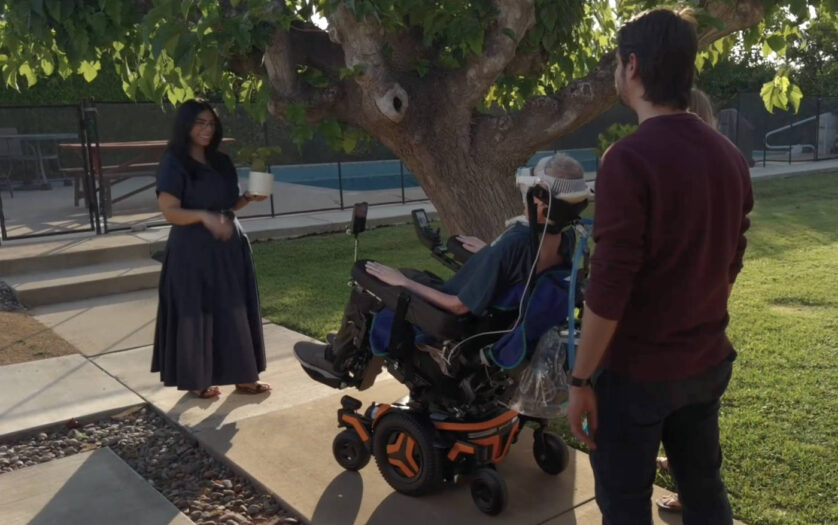
For some people who use power wheelchairs, driving with a joystick is not an option, and alternative drive controls can be an essential part of independent movement. Leveraging the precision eye-tracking system on Apple Vision Pro, a new power wheelchair control feature offers users a responsive input method for compatible alternative drive systems. With Vision Pro, eye tracking doesn’t require frequent recalibration and works in a variety of lighting conditions.5 The feature launches with Tolt and LUCI alternative drive systems in the U.S., with accessory support for both Bluetooth and wired connections,6 and Apple will continue to work with developers to expand support for more wheelchair drive systems.
“The option to control my power wheelchair on my own is gold to me,” said Pat Dolan, founder of GeoALS and a member of Team Gleason’s patient advisory board, who has lived with ALS for 10 years. “With this new feature, Apple is developing life-enhancing technology for the people who need it most.”
“Over the past decade, we’ve seen eye-driven wheelchair systems evolve in incredible ways,” said Blair Casey, Team Gleason’s CEO. “Leveraging Apple Vision Pro’s eye-tracking capabilities in this way is a huge step forward. Team Gleason is proud to support this initiative and excited to see the benefits it can bring to people who use power wheelchairs.”